If you've been using cryptocurrency through an exchange like Binance, you've probably heard the phrase: "Not your keys, not your crypto." But what does that actually mean, and when should you care?
Is this guide for you? If you just want to buy some crypto, send money to family, or make occasional transfers—you don't need this guide. Our beginner's guide covers everything you need using Binance, which is simpler and works fine for everyday use. This guide is for people holding larger amounts or wanting maximum control over their funds.
This guide is for people who are already comfortable with the basics—buying crypto, sending transactions, using an exchange—and now want to understand the next level: taking full control of your funds through self-custody.
Why Self-Custody Matters
When your crypto is on Binance (or any exchange), you're trusting that company to keep it safe. For most people, most of the time, this works fine. But there's a risk you should understand.
The history lesson: In 2022, FTX—one of the world's largest cryptocurrency exchanges—collapsed overnight. Users who kept their funds on FTX lost billions of dollars. This wasn't a hack; the company simply misused customer funds. The same happened with Mt. Gox (2014), QuadrigaCX (2019), and Celsius (2022).
The people who didn't lose money? Those who had withdrawn their crypto to self-custody wallets—wallets where they held their own keys, and no company could touch their funds.
The trade-off:
- Custodial (exchange): Convenient, password recovery possible, but you're trusting a company
- Self-custody: You have full control, but you're responsible for your own security
The Safest Option: P2P with Physical Exchange Centers
For maximum security and privacy, many experienced users prefer peer-to-peer (P2P) transactions through trusted physical exchange centers. These are real businesses where you can walk in, meet someone face-to-face, and exchange cash for crypto (or vice versa).
Why this is the safest approach:
- No online attack surface – Cash transactions can't be hacked
- Verify the other party in person – You know who you're dealing with
- More privacy – Some require less identity verification than online exchanges
- Local support – A real person you can return to if there are issues
How to find trusted exchange centers:
- Look for established businesses with physical locations and reviews
- Ask in local crypto communities for recommendations
- Start with small amounts to test the service
- Avoid random meetups with strangers—use established businesses
This approach combines the benefits of self-custody (you receive crypto directly to your own wallet) with the security of dealing with a known, reputable business. It's particularly valuable in regions where online exchanges have restrictions or where you want to avoid sharing personal documents online.
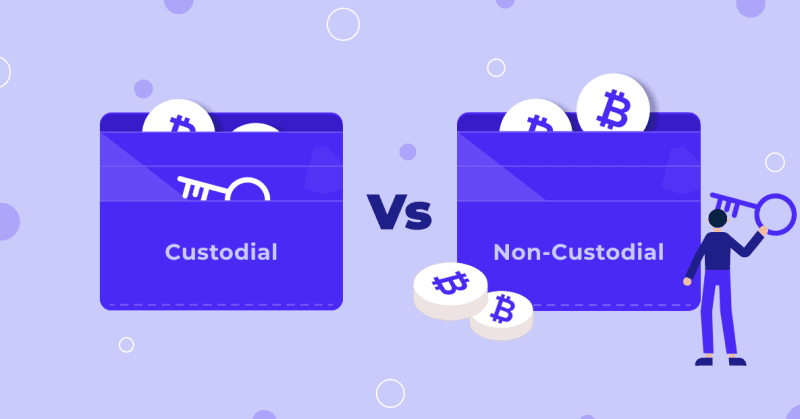
Custodial vs Non-Custodial: The Real Difference
Before diving into specific wallets, you need to understand the fundamental choice in crypto storage: who holds the keys? This decision affects your security, convenience, and what happens if something goes wrong.
| Aspect | Custodial (Binance, Coinbase) | Non-Custodial (Your own wallet) |
|---|---|---|
| Who holds the keys? | The company | You |
| Can they freeze your funds? | Yes | No |
| Password recovery? | Yes | No—lose your keys, lose your crypto |
| If company fails? | You might lose funds | Not affected |
| Privacy | They know your identity | Can be more private |
| Best for | Everyday use, beginners | Larger holdings, long-term storage |
Think of it this way:
- Custodial = Money in a bank. Convenient, but you trust the bank.
- Self-custody = Cash in your own safe. Full responsibility, but no one can freeze it.
Types of Self-Custody Wallets
If you've decided to take control of your own keys, the next question is: which wallet should you use? Self-custody wallets fall into two main categories based on how they connect to the internet.

Hot Wallets (Software)
Hot wallets are apps connected to the internet. They're convenient for regular use but less secure than hardware wallets.
| Wallet | Type | Best For |
|---|---|---|
| MetaMask | Browser/Mobile | Ethereum and EVM-compatible chains |
| Trust Wallet | Mobile | Multi-chain support, beginner-friendly |
| Phantom | Browser/Mobile | Solana ecosystem |
| Exodus | Desktop/Mobile | Beautiful interface, many coins |
| Rabby | Browser | Multiple chains, security-focused |
When to use: Smaller amounts you actively use, interacting with DeFi apps, everyday transactions.
Cold Wallets (Hardware)
Hardware wallets store your keys on a physical device that never connects to the internet. This makes them nearly impossible to hack remotely.
| Wallet | Price Range | Notable Features |
|---|---|---|
| Ledger Nano S Plus | ~$79 | Affordable, supports many coins |
| Ledger Nano X | ~$149 | Bluetooth, larger storage |
| Trezor Model One | ~$69 | Open-source, budget-friendly |
| Trezor Model T | ~$219 | Touchscreen, open-source |
| Trezor Safe 3 | ~$79 | Newer model, secure element |
When to use: Larger amounts, long-term holdings, anything you'd be upset to lose.
The Ideal Setup
Many experienced users combine both:
- Hardware wallet: Long-term savings, larger amounts
- Hot wallet: Daily transactions, small amounts for spending
- Exchange: On-ramp/off-ramp for buying and selling
Think of it like: savings account (hardware) → checking account (hot wallet) → store (exchange).
The Seed Phrase: Your Master Key
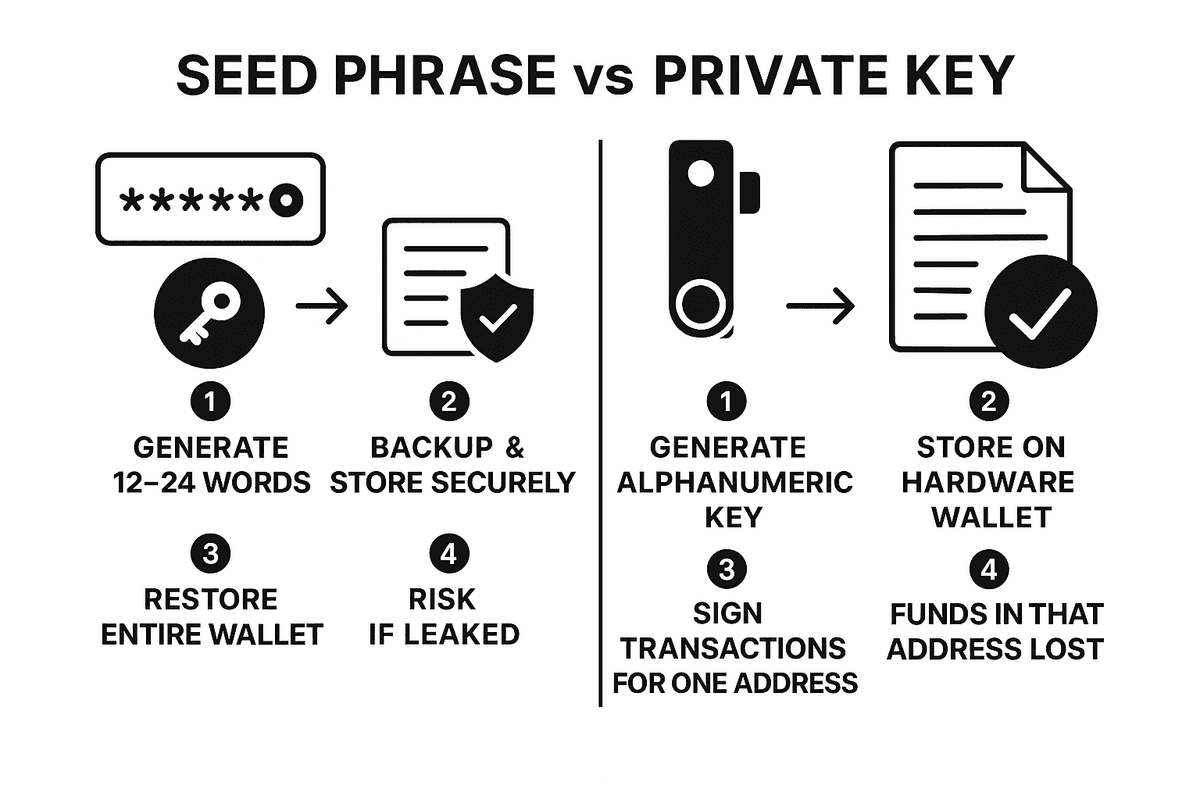
When you create a self-custody wallet, you'll receive a seed phrase (also called recovery phrase)—typically 12 or 24 random words. This is the most important thing in cryptocurrency security.
What the seed phrase does:
- It can regenerate all your private keys and wallet addresses
- Anyone with these words has complete access to your funds
- If you lose it and lose access to your device, your crypto is gone forever
The Golden Rules
Never do this:
- ❌ Share your seed phrase with anyone—not "support staff," not friends, not family
- ❌ Enter it on any website (phishing is extremely common)
- ❌ Take a photo or screenshot
- ❌ Store it in email, cloud storage, notes apps, or password managers
- ❌ Store it on any internet-connected device
Always do this:
- ✅ Write it down on paper immediately when creating the wallet
- ✅ Store it in a secure physical location (fireproof safe, safety deposit box)
- ✅ Consider a metal backup plate (survives fire and water)
- ✅ Store copies in multiple secure locations
- ✅ Tell a trusted person where to find it (in case something happens to you)
Common Scams to Avoid
The "support" scam: Someone contacts you claiming there's an issue with your wallet and asks for your seed phrase to "fix" it. This is always a scam. No legitimate service ever needs your seed phrase.
The fake wallet scam: You download what looks like a real wallet app, but it's fake. It steals your seed phrase when you enter it. Only download wallets from official sources.
The "verify your wallet" scam: A website asks you to "connect and verify" your wallet by entering your seed phrase. Legitimate wallet connections never require your seed phrase—only transaction approvals.
Setting Up Your First Self-Custody Wallet
Let's walk through setting up MetaMask as an example (the process is similar for most hot wallets).
Step 1: Download from official source only
- Go directly to metamask.io
- Verify the URL carefully (scammers use similar-looking domains)
- Install the browser extension or mobile app
Step 2: Create a new wallet
- Click "Create a new wallet"
- Create a strong password (this is just for the app, not your seed phrase)
Step 3: Secure your seed phrase
- Write down the 12 words on paper—in order
- Store it somewhere safe immediately
- Verify the phrase by entering it when prompted
Step 4: Never enter this phrase again
- You'll only need it to recover your wallet on a new device
- If any website or person asks for it, it's a scam
Moving Crypto from Exchange to Self-Custody
Once your wallet is set up, here's how to move your crypto from Binance:
- Get your wallet address from your self-custody wallet (click "Receive")
- Choose the correct network (this must match between wallet and exchange)
- Go to Binance → Withdraw and select the cryptocurrency
- Paste your wallet address and select the same network
- Start with a small test transaction ($5-10) to verify everything works
- Once confirmed, send the larger amount
Critical: If the network doesn't match, your funds can be lost permanently. Always verify: same crypto, same network, correct address.
Decentralized Exchanges (DEX)
Once you have a self-custody wallet, you can trade directly on decentralized exchanges without needing an account or verification.
Popular DEXs:
| DEX | Network | Best For |
|---|---|---|
| Uniswap | Ethereum, others | Most popular, many tokens |
| Jupiter | Solana | Best prices on Solana |
| PancakeSwap | BNB Chain | Lower fees than Ethereum |
| Curve | Ethereum | Stablecoin swaps |
How DEXs work:
- Connect your wallet to the DEX website
- Select which tokens you want to swap
- Approve the transaction in your wallet
- The swap happens automatically through smart contracts
Advantages:
- No account or verification needed
- You control your funds throughout
- Access to tokens not listed on centralized exchanges
Risks:
- No customer support if you make mistakes
- Scam tokens are common—verify contracts before swapping
- Higher fees on some networks (especially Ethereum)
Security Best Practices
Self-custody means you're responsible for your own security. The good news: most attacks are preventable with basic habits. Here's what to do depending on your setup.
For Hot Wallets
- Use a separate browser or device for crypto
- Don't install random browser extensions
- Verify every transaction before signing
- Be suspicious of any site asking for unusual permissions
- Keep your software updated
For Hardware Wallets
- Buy directly from the manufacturer, never secondhand
- Set it up yourself—never use a pre-configured device
- Store it in a secure location when not in use
- Keep the firmware updated
General Security
- Use a dedicated email for crypto accounts
- Enable 2FA everywhere (authenticator app, not SMS)
- Be extremely skeptical of unsolicited messages
- Never rush—scammers create urgency
- When in doubt, don't click
When to Use What
Now that you understand the options, here's a practical guide to deciding where to keep your crypto. The right choice depends on how much you're holding and how often you need to access it.
Keep on an exchange (Binance):
- Money you're actively trading
- Small amounts for quick purchases
- Amounts you're okay losing if the exchange has problems
Move to a hot wallet:
- Funds you want to use with DeFi apps
- Medium-term holdings
- Amounts where you want more control but still need accessibility
Move to a hardware wallet:
- Long-term savings
- Larger amounts
- Funds you don't need to access frequently
- Anything you'd be seriously upset to lose
Final Thoughts
Self-custody is about one thing: taking responsibility for your own financial security. It's not for everyone, and it's not required to use cryptocurrency. Many people use exchanges successfully for years.
But if you:
- Hold significant amounts of crypto
- Want true ownership, not an IOU from a company
- Don't trust centralized companies with your savings
- Want to use DeFi applications directly
...then self-custody is worth learning.
Start small. Move a small amount to a hot wallet first. Get comfortable with the process. Then consider a hardware wallet for larger holdings. The skills you learn will protect you for as long as you're in crypto.
Remember: Your seed phrase is everything. Protect it like you'd protect the deed to your house—because in the crypto world, it's even more important.
Note on regulations: Self-custody is legal in most jurisdictions, but tax obligations still apply to your crypto profits. Keep records of your transactions for tax purposes.
References
Links mentioned in this guide:
- Understanding Cryptocurrency: Platforms, Wallets, and Getting Started – Our beginner's guide
- MetaMask – Popular browser/mobile wallet
- Ledger – Hardware wallet manufacturer
- Trezor – Hardware wallet manufacturer (open-source)
- Uniswap – Decentralized exchange (Ethereum)
- Jupiter – Decentralized exchange (Solana)
Further Reading & Useful Links
Learning Resources
- Ledger Academy – Hardware wallet education and security guides
- MetaMask Learn – Wallet tutorials and Web3 basics
- Rabbit Hole – Learn Web3 by doing
Security Resources
- Revoke.cash – Check and revoke token approvals
- Etherscan Token Approvals – Review smart contract permissions
Market Data & Analytics
- DeFi Llama – DeFi analytics and TVL tracking
- CoinGecko – Cryptocurrency prices and market data
- Dune Analytics – On-chain data dashboards
Official Documentation
- Ethereum.org – Ethereum foundation resources
- Solana Docs – Solana documentation